
Token and queue management for clinics
Curogrid gives every patient who walks into a clinic a token and keeps the waiting line on one screen, called Today. It shows who is next, who has been called, who is with the doctor and how long each patient has waited. The doctor sees the same line on the phone and calls the next patient from there.
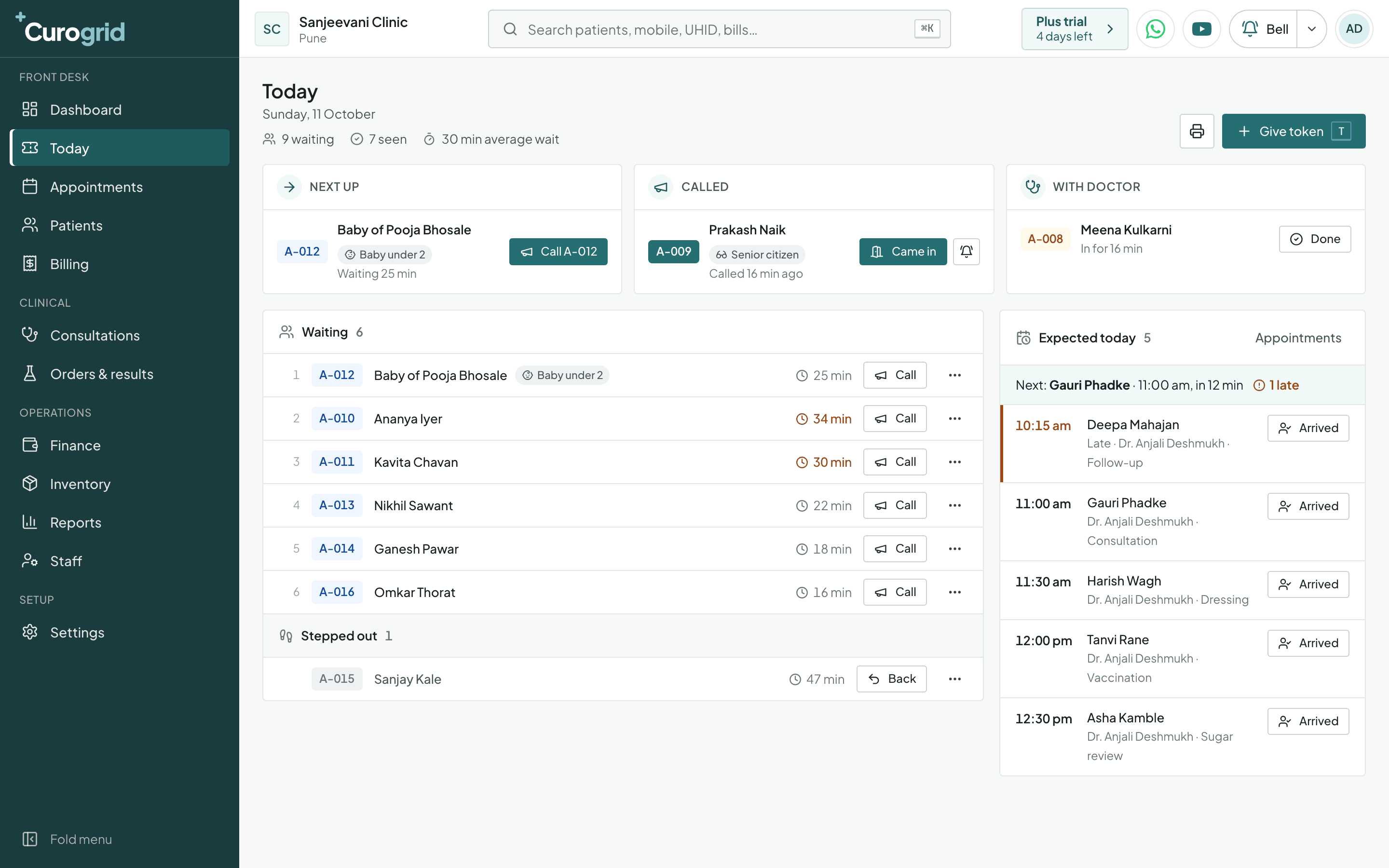
How does the token line work in Curogrid?
- Three boxes that answer “who is next?”
- Next up, Called and With doctor sit across the top. One button calls the next token, one marks that the patient came in, and one marks the visit done.
- Wait times that change colour
- Every row shows how long that patient has waited. A wait of more than 30 minutes turns orange and a wait of more than an hour turns red, so nobody is forgotten at the back of a full room. The top of the screen shows the average wait for the day.
- Babies and senior citizens are marked
- A token can carry one of five tags: Emergency, Senior citizen (60+), Pregnant, Disability or Baby under 2. The tag shows beside the name at the desk and in the doctor's line.
- Stepped out is not lost
- A patient who has gone for tea or to the chemist moves to Stepped out and keeps their token. One tap brings them back into the line.
- Walk-ins and appointments together
- The day's appointments are listed beside the line, with who is late. When a booked patient arrives, one button puts them in the line with everyone else.
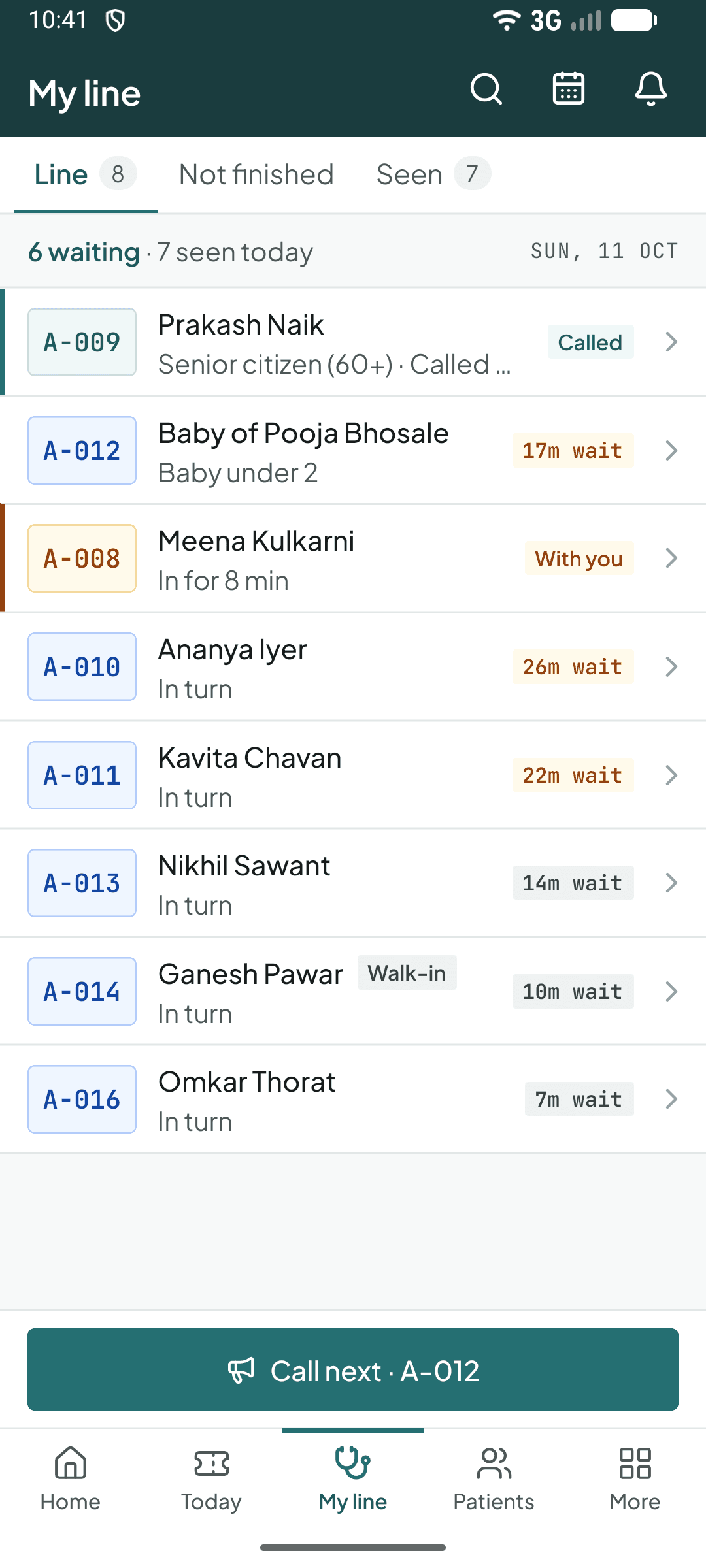
The same thing on the phone app.
Tokens and the waiting line at a glance
| Where it is | The Today screen on the web, and Today and My line in the phone app |
|---|---|
| A token can be | Waiting, Called, With doctor, Stepped out, Done, Didn't come or Cancelled |
| Wait colours | Orange after 30 minutes, red after 60 minutes |
| Priority tags | Emergency, Senior citizen (60+), Pregnant, Disability and Baby under 2 |
| Appointment needed | No. A token does not need a booking |
From the blog: How to run a token system in a walk-in clinic
Questions about tokens and the waiting line
Yes. The phone app's My line screen shows the tokens in order with each wait time, and a Call next button at the bottom.
Yes. Tokens do not need an appointment. The desk gives a token to whoever walks in, and that is the whole line.
Yes. Any waiting token has its own Call button, so the doctor or the desk can call someone ahead of the order when it is needed.
The other main screens
Appointments
A column for each doctor, and a whole course booked at once.
Patient files
Allergies up top, then every visit, prescription, test and bill.
Billing
Today's money by UPI, cash and card, and a list of who owes.
Specialities
It works the way your speciality does
The same screen uses different words, services and lists for each kind of clinic.
- General practiceA busy OPD: tokens, quick prescriptions, blood pressure over time.Curogrid for general physicians
- PaediatricsGrowth tracked visit by visit, syrups and drops, vaccination visits.Curogrid for paediatricians
- GynaecologyAntenatal visits booked as a course, scans and tests in one tap.Curogrid for gynaecologists
- Skin and hairLaser and peel sessions as a course, skin medicines, photo consent.Curogrid for dermatologists
- ENTAudiometry and endoscopy as services, ear and nose directions ready to pick.Curogrid for ENT specialists
- PhysiotherapyA whole course of sessions booked at once, packages and home visits.Curogrid for physiotherapists
Try Curogrid in your own clinic
The trial is 5 days of the Pro plan. Pick your speciality, and the services, medicines and booking are set up before your first patient.