
Curogrid features: everything a clinic does in a day
Curogrid covers a clinic's day in one system, from the first token of the morning to closing the day's cash. Four screens do most of the work: tokens and the waiting line, appointments, patient files and billing. 9 more parts, such as stock and reports, are in both plans.
What are Curogrid's main features?
Four screens, each shown here as it really looks, on a clinic we set up with invented patients.
Tokens and the waiting line
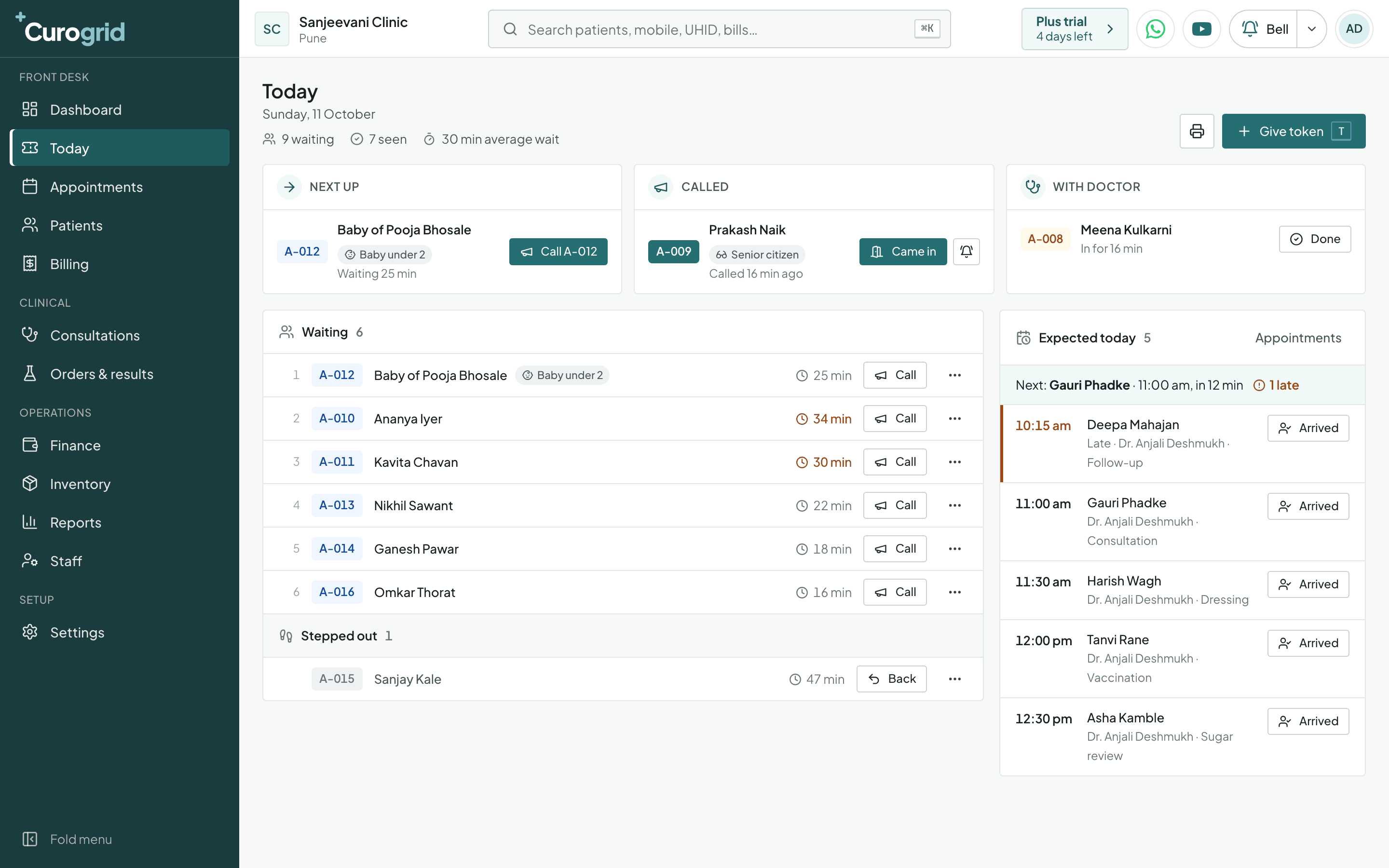
Curogrid gives every patient who walks into a clinic a token and keeps the waiting line on one screen, called Today. It shows who is next, who has been called, who is with the doctor and how long each patient has waited.
- Three boxes that answer “who is next?”
- Wait times that change colour
- Babies and senior citizens are marked
Appointments
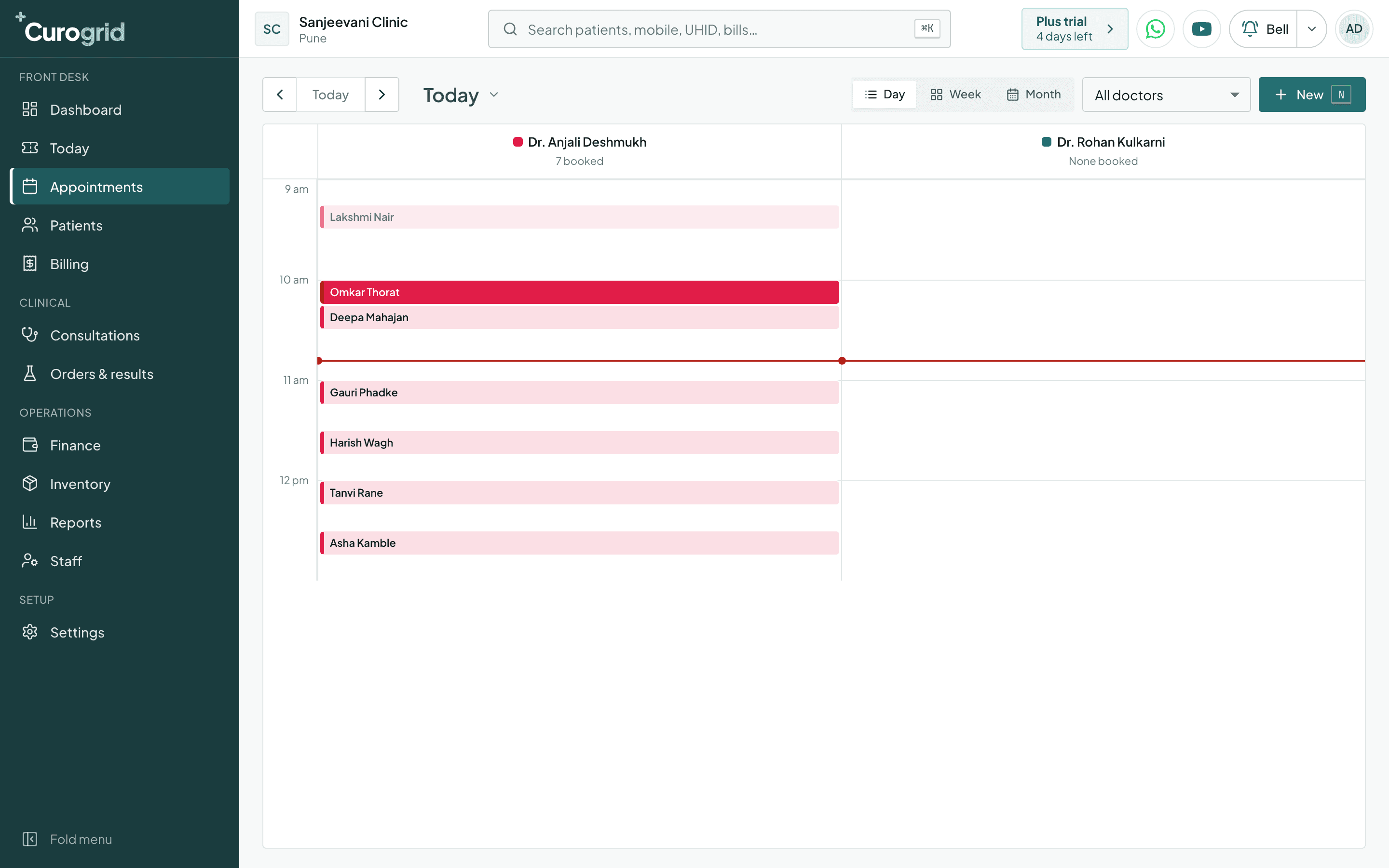
Curogrid's appointment book is the clinic's shared calendar. It gives each doctor a column and a colour, in day, week or month view.
- A column and a colour for each doctor
- Day, week and month
- A course of visits in one booking
Patient files
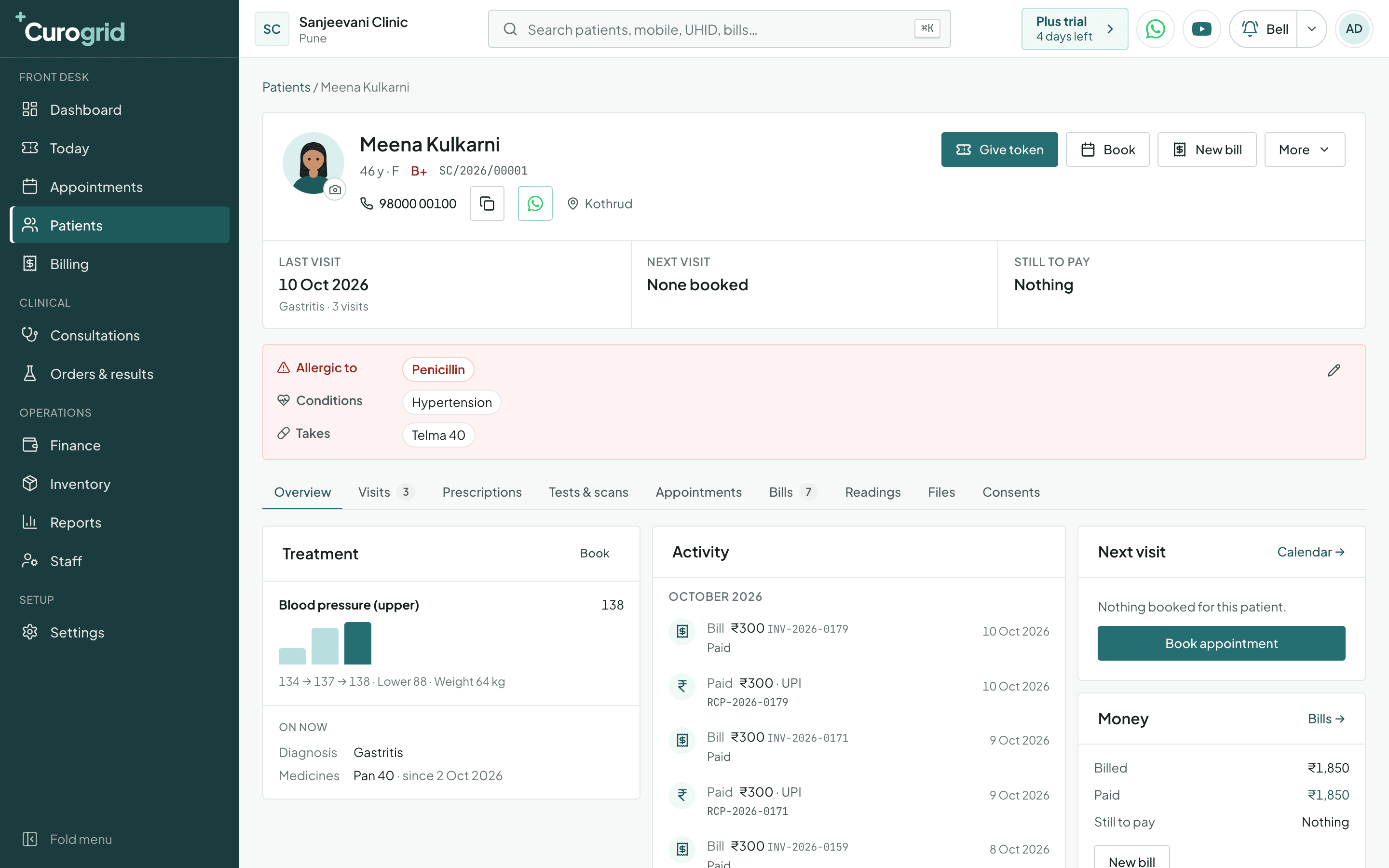
In Curogrid every patient has one file, the clinic's electronic medical record for that person. Allergies, long-term conditions and current medicines are at the top.
- Allergies cannot be missed
- Last visit, next visit, still to pay
- A first card that follows your speciality
Billing
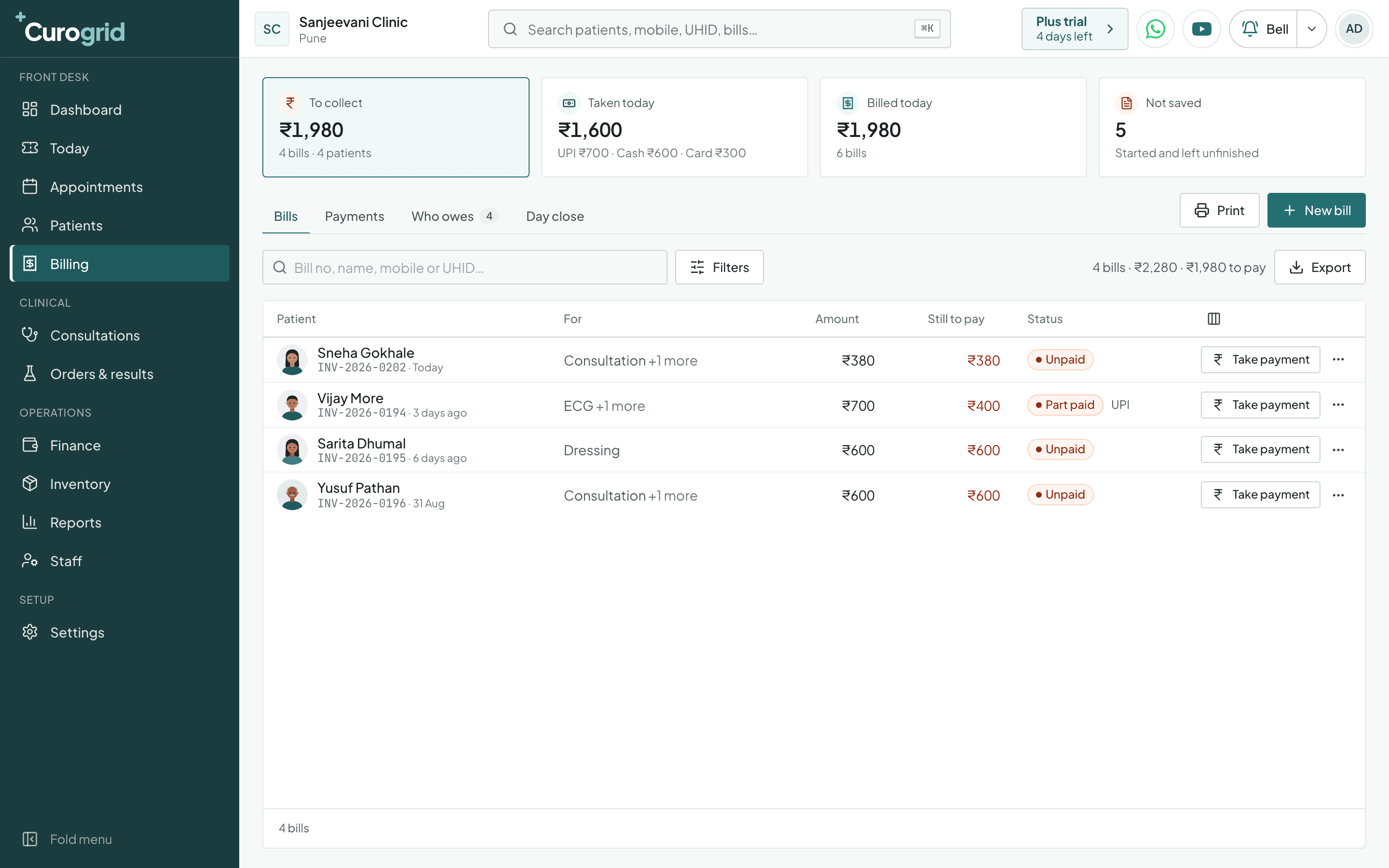
Curogrid's billing screen is where a clinic raises bills and takes payment. It shows four numbers for the day: what is still to collect, what was taken (split by UPI, cash and card), what was billed, and bills started but not saved.
- UPI, cash and card, counted apart
- Part payments are normal
- Who owes
What does the owner see each morning?
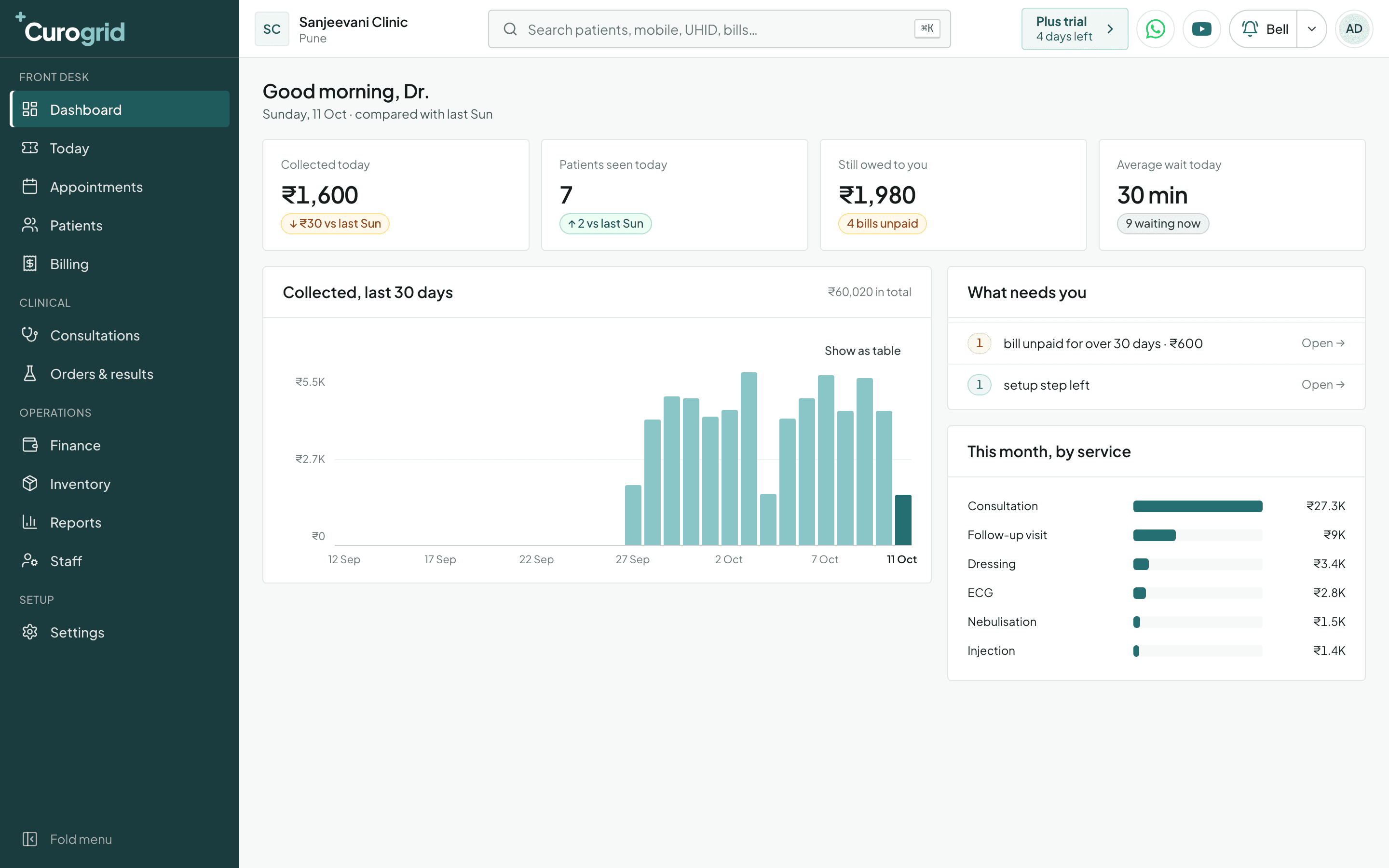
Curogrid’s dashboard shows the owner what was collected today, how many patients were seen, what is still owed and the average wait, each compared with the same day last week. A short list named “What needs you” points at any bill that has been unpaid for over 30 days.
What else is in every plan?
These 9 parts of Curogrid are in both plans, Plus and Pro.
- Visits and prescriptions
- Medicine names are offered as you type, from your speciality's list. Save a set of medicines you write together and reuse it. A medicine that matches the patient's recorded allergy is flagged in red.
- Tests and scans
- Order a test or a scan in one tap on the visit, or a procedure from a new order, and follow it step by step: Ordered, Sample taken, At the lab, Result in, Checked, Given to patient.
- Stock
- Keep count of what the clinic holds, including items that come in batches and expire, such as vaccines.
- Expenses and vendors
- Record what the clinic spends and which vendor it was paid to, next to what it earns.
- Reports
- 10 reports: Collections, Services and treatments, Doctor-wise, Outstanding dues, GST, Expenses and what was left, Patients, Visits and diagnoses, Appointments and waiting, Stock. Staff attendance and an activity log of who did what are kept as well.
- Staff and roles
- Each person signs in as themselves. You decide what a doctor or a receptionist is allowed to open.
- Reminders
- Reminders to patients go out by WhatsApp and email. On the Pro plan they go from your clinic's own WhatsApp number; on Plus that is an add-on at ₹289 a month. SMS is not available yet.
- Consent forms
- Starter consent forms for examination, procedures, anaesthesia and photographs, signed on screen and kept in the patient's file.
- Online booking and Google Reviews
- A booking page your patients can use, and Google Reviews connected to the clinic.
What should you ask before choosing clinic software?
Ask these 11 questions of any clinic software, ours included. Curogrid's answers are in the last column, including the ones that are no.
| Question to ask | Why it matters | Curogrid’s answer |
|---|---|---|
| Is the price per clinic or per doctor? | A per-doctor price grows each time a doctor joins. | Per clinic. Plus is ₹399 a month and Pro is ₹999 a month, before GST. |
| Does it arrive set up for my speciality? | A blank system means typing in every service, price and medicine before the first patient. | Yes, for 10 specialities. Services, starter prices, medicines, tests, procedures and consent forms are created when you pick your speciality in clinic setup. |
| Can it run a walk-in line without appointments? | A clinic that sees walk-ins cannot use software that needs a booking first. | Yes. A token does not need a booking, and booked patients join the same line when they arrive. |
| Can the whole staff use it? | If the receptionist and the compounder find it hard, it is not used. | Yes. Each person has a login and sees what their role allows. Plus has 6 logins and Pro has 12. |
| Does it work on a phone? | The doctor is in the consulting room and the owner is often away from the clinic. | Yes. There is a phone app for Android and iPhone that shows the line, the files and the bills. |
| Does it record how each bill was paid? | Cash in the drawer and money in the bank are checked separately at the end of the day. | Yes. Each payment is recorded as UPI, cash or card, and the day's total is split the same way. |
| Can I bring my old patient list in? | Nobody wants to type years of patients in again. | Yes, from an Excel or CSV file. You check the result before pressing Import, and an import can be undone. |
| Can I take my data out? | The records belong to the clinic, whatever software it uses next. | Yes. Patients, bills and payments export as files, and a backup of the whole clinic downloads as one ZIP. |
| Can I try it before paying? | A demo shows the software. Only a trial shows it in your own clinic. | Yes. Every new clinic gets 5 days of the Pro plan free. |
| Does it handle admitted patients and beds? | A hospital needs admissions, a bed board and discharge summaries. | No. Curogrid is for clinics and OPD work. The inpatient side is not built yet. |
| Does it have dental charting? | A dentist needs a tooth chart and dental treatment plans. | No. Curogrid has no dental setup. Dentists should use MolarPlus, from the same company. |
Questions about what Curogrid does
Yes. Curogrid has a phone app for Android and iPhone as well as the web version. The doctor can see the line, call the next patient and write the visit from the phone, and the desk can give tokens, raise bills and take payments. The apps are being listed on Google Play and the App Store, and are not in the stores yet.
No. Curogrid runs in a web browser, so there is nothing to install on the clinic computer. You sign in and it is ready.
Yes. Curogrid imports a patient list from an Excel or CSV file, such as the export from your old software. You match the columns, check the result and press Import, and an import can be undone. For a paper register or anything else, ask us on WhatsApp.
Yes. In Curogrid the patient list, the bill list and the payments list each have an Export button. The Data backup page in Settings downloads the whole clinic as one ZIP file.
Yes. Curogrid sends reminders by WhatsApp and email. On Plus they go from the Curogrid number, and on Pro from your clinic's own WhatsApp number. SMS is not available yet.
Curogrid has 10 reports: Collections, Services and treatments, Doctor-wise, Outstanding dues, GST, Expenses and what was left, Patients, Visits and diagnoses, Appointments and waiting, Stock. Plus keeps 12 months of report history and Pro has no time limit.
No. Curogrid does not work out a dose or choose a diagnosis. It offers medicine names as you type, and once you have written a medicine it remembers how your clinic usually gives it. Diagnoses are picked by the doctor from an ICD-10 list. It does flag a medicine that matches an allergy recorded for the patient.
Try Curogrid in your own clinic
The trial is 5 days of the Pro plan. Pick your speciality, and the services, medicines and booking are set up before your first patient.